Secure access to your applications by using Azure identity services
linking:: AZ-900, Azure-Identity
Compare authentication and authorization
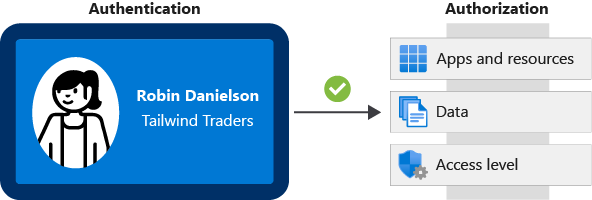
Authentication is the process of establishing the identity of a person or service that wants to access a resource. It involves the act of challenging a party for legitimate credentials and provides the basis for creating a security principal for identity and access control. It establishes whether the user is who they say they are. Authentication establishes the user’s identity, but authorization is the process of establishing what level of access an authenticated person or service has. It specifies what data they’re allowed to access and what they can do with it.
What is Azure Active Directory?
Can be used by IT administrators, app developers, users, and online service subscribers. Can secure both external and internal resources.
- Authentication: This includes verifying identity to access applications and resources. It also includes providing functionality such as self-service password reset, multifactor authentication, a custom list of banned passwords, and smart lockout services.
- Single sign-on: SSO enables you to remember only one username and one password to access multiple applications. A single identity is tied to a user, which simplifies the security model. As users change roles or leave an organization, access modifications are tied to that identity, which greatly reduces the effort needed to change or disable accounts.
- Application management: You can manage your cloud and on-premises apps by using Azure AD. Features like Application Proxy, SaaS apps, the My Apps portal (also called the access panel), and single sign-on provide a better user experience.
- Device management: Along with accounts for individual people, Azure AD supports the registration of devices. Registration enables devices to be managed through tools like Microsoft Intune. It also allows for device-based Conditional Access policies to restrict access attempts to only those coming from known devices, regardless of the requesting user account.
What are multifactor authentication and Conditional Access?
Conditional Access is a tool that Azure Active Directory uses to allow (or deny) access to resources based on identity signals. These signals include who the user is, where the user is, and what device the user is requesting access from.
- Require multifactor authentication to access an application.
- You can configure whether all users require multifactor authentication or only certain users, such as administrators.
- You can also configure whether multifactor authentication applies to access from all networks or only untrusted networks.
- Require access to services only through approved client applications.
- For example, you might want to allow users to access Office 365 services from a mobile device as long as they use approved client apps, like the Outlook mobile app.
- Require users to access your application only from managed devices.
- A managed device is a device that meets your standards for security and compliance.
- Block access from untrusted sources, such as access from unknown or unexpected locations.